This notebook walks through the consumer side of the FAIR2Adapt access control workflow. You will:
Unwrap the dataset key using your private key
Decrypt the dataset
Verify the access grant
Step 1 — Load your private key
Your private key was generated in Chapter 0 and saved
to keys/example-consumer-private.pem. It never leaves your machine.
from pathlib import Path

KEYS_DIR = Path("keys")
DATA_DIR = Path("data")

CONSUMER_PRIVATE_KEY_PATH = KEYS_DIR / "example-consumer-private.pem"

if not CONSUMER_PRIVATE_KEY_PATH.exists():
    print("ERROR: Consumer private key not found.")
    print("Run 00_setup_did.ipynb first to generate it.")
    raise FileNotFoundError(CONSUMER_PRIVATE_KEY_PATH)

consumer_private_pem = CONSUMER_PRIVATE_KEY_PATH.read_bytes()
print(f"Loaded private key from: {CONSUMER_PRIVATE_KEY_PATH}")
print(f"Key size: {len(consumer_private_pem)} bytes")
Step 2 — Download the wrapped key
The provider published a wrapped dataset key specifically for your DID. In production, this would be at a URL like:
https://fair2adapt.github.io/fair-data-access/keys/<hash-of-your-did>/dataset.keyHere we load it from the local file created by Chapter 1.
from fair_data_access.keys import load_wrapped_key

WRAPPED_KEY_PATH = KEYS_DIR / "wrapped-dataset-key.json"

if not WRAPPED_KEY_PATH.exists():
    print("ERROR: Wrapped key not found.")
    print("Run 01_provider.ipynb first to generate it.")
    raise FileNotFoundError(WRAPPED_KEY_PATH)

wrapped_envelope = load_wrapped_key(str(WRAPPED_KEY_PATH))
print(f"Loaded wrapped key from: {WRAPPED_KEY_PATH}")
print(f"Envelope size: {len(wrapped_envelope)} bytes")
Step 3 — Unwrap the dataset key
Using ECDH key agreement: the wrapped envelope contains an ephemeral public key from the provider. Your private key + that ephemeral public key produce a shared secret, which decrypts the dataset key.
from fair_data_access.keys import unwrap_key

dataset_key = unwrap_key(wrapped_envelope, consumer_private_pem)

print(f"Dataset key recovered: {len(dataset_key) * 8}-bit AES key")
print(f"Key (hex): {dataset_key.hex()[:16]}...{dataset_key.hex()[-4:]}")
Step 4 — Decrypt the dataset
With the recovered dataset key, decrypt the .enc file to get back the
original CSV.
from fair_data_access.encrypt import decrypt_file

ENCRYPTED_PATH = DATA_DIR / "synthetic-biodiversity-observations.csv.enc"

if not ENCRYPTED_PATH.exists():
    print("ERROR: Encrypted dataset not found.")
    print("Run 01_provider.ipynb first to generate it.")
    raise FileNotFoundError(ENCRYPTED_PATH)

decrypted_path = decrypt_file(str(ENCRYPTED_PATH), key=dataset_key)
print(f"Decrypted: {decrypted_path}")
Step 5 — Verify the data
Load the decrypted CSV and confirm it matches the original synthetic dataset.
import pandas as pd

df = pd.read_csv(decrypted_path, comment="#")
print(f"Rows: {len(df)}, Columns: {list(df.columns)}")
print()
print("=== First 5 rows ===")
df.head()
# Quick integrity check: compare with the original
original = pd.read_csv(
DATA_DIR / "synthetic-biodiversity-observations.csv", comment="#"
)
assert len(df) == len(original), "Row count mismatch!"
assert list(df.columns) == list(original.columns), "Column mismatch!"
assert df.equals(original), "Data mismatch!"
print(f"✅ Integrity verified — {len(df)} rows match the original exactly.")Step 6 — Verify the access grant (audit trail)
In production, the access grant is a signed nanopublication on the decentralised nanopub network. Anyone can independently verify:
The grant exists — query the nanopub network by dataset URI + consumer DID
The signature is valid — the grant was signed by the same ORCID that published the policy
The policy was followed — the grant references the policy nanopub
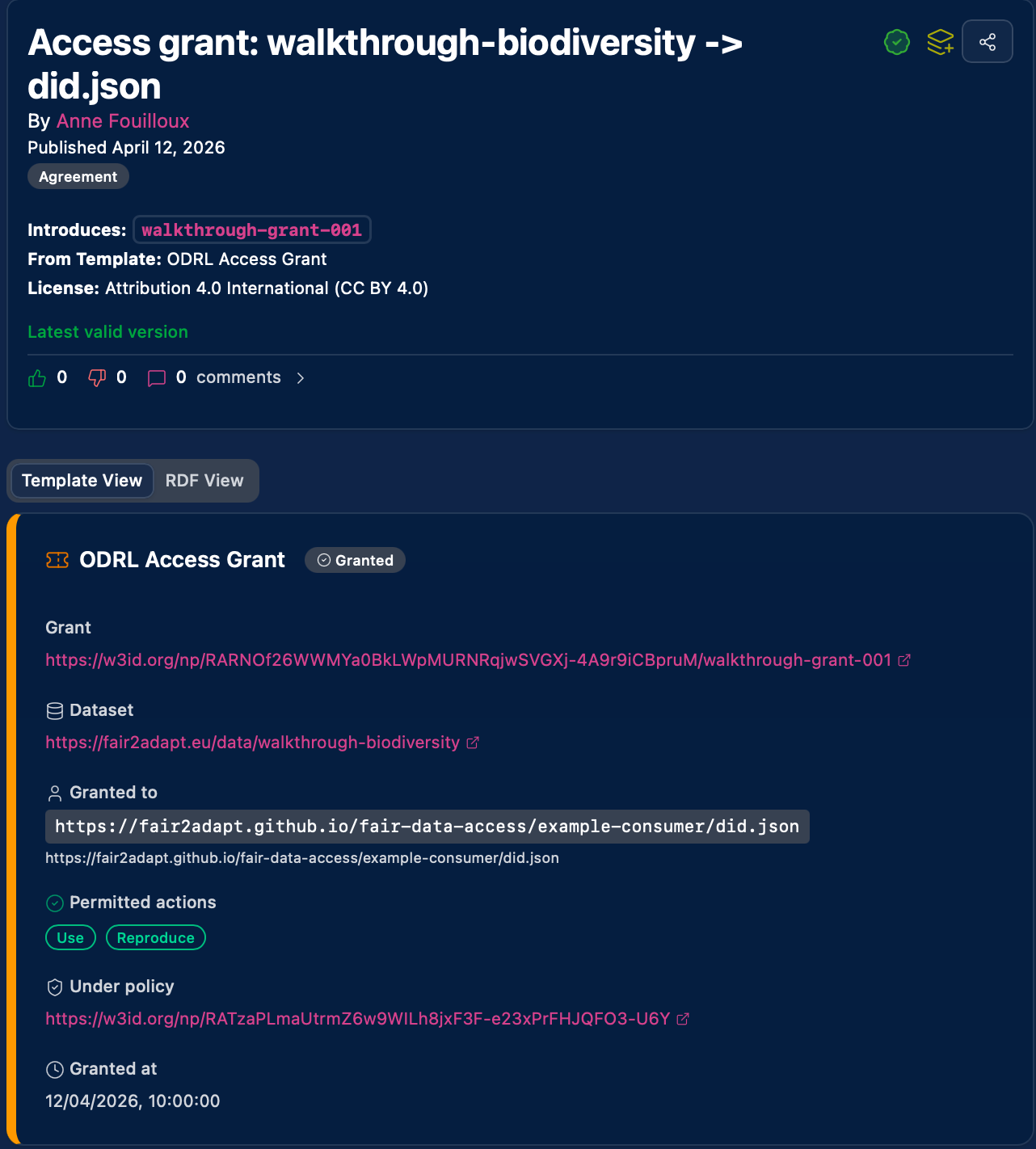
The access grant as rendered by the Science Live platform.
import json

# In production, this would be:
# from fair_data_access.grant import verify_access
# result = verify_access(dataset_uri, consumer_did, policy_nanopub_uri)

# For the walkthrough, we show what a verified grant looks like:
verified_grant = {
    "status": "GRANTED",
    "dataset": "https://fair2adapt.eu/data/walkthrough-biodiversity",
    "consumer_did": "did:web:fair2adapt.github.io:fair-data-access:example-consumer",
    "policy_nanopub": "https://w3id.org/np/RATzaPLmaUtrmZ6w9WILh8jxF3F-e23xPrFHJQFO3-U6Y",  # view: https://platform.sciencelive4all.org/np/?uri=https://w3id.org/np/RATzaPLmaUtrmZ6w9WILh8jxF3F-e23xPrFHJQFO3-U6Y
    "grant_nanopub": "https://w3id.org/np/RARNOf26WWMYa0BkLWpMURNRqjwSVGXj-4A9r9iCBpruM",  # view: https://platform.sciencelive4all.org/np/?uri=https://w3id.org/np/RARNOf26WWMYa0BkLWpMURNRqjwSVGXj-4A9r9iCBpruM
    "signature_valid": True,
    "publisher_matches_policy": True,
}

print("=== Access Grant Verification ===")
print(json.dumps(verified_grant, indent=2))Summary
The consumer has:
| Step | What happened | Trust guarantee |
|---|---|---|
| Unwrap key | Recovered the dataset key from the wrapped envelope | Only your private key could do this |
| Decrypt | Got back the original dataset from the .enc file | AES-GCM integrity check passed |
| Verify grant | Confirmed the grant nanopub exists and is properly signed | Cryptographic signature verification |
The complete chain of trust:
ODRL Policy (signed nanopub)
  ↓ evaluated against
Access Request (consumer DID + purpose)
  ↓ results in
Access Grant (signed nanopub + wrapped key)
  ↓ unwrapped by consumer
Dataset Key
  ↓ decrypts
Original Dataset ✓
Every link in this chain is cryptographically verifiable and publicly auditable, while the dataset itself remains protected.
What’s next?
Adapt to your data: Replace
data/synthetic-biodiversity-observations.csvwith your own file and re-run01_provider.ipynb. No code changes needed.Publish for real: Use the Science Live platform to create the ODRL policy and access grant as signed nanopublications.
Set up your own DID: Follow Chapter 0 to publish your identity via GitHub Pages.
Automate: See the GitHub Actions workflow for fully automated policy evaluation and key wrapping.